
หน้าหลัก › บริการ › Mobile Application Penetration Test
Mobile Application Penetration Test
ทดสอบความปลอดภัย mobile app ทั้ง iOS และ Android ตามมาตรฐาน OWASP MASVS
ทำไม Mobile Application Penetration Test ถึงสำคัญ
แอปมือถือเป็นช่องทางหลักที่ลูกค้าใช้เข้าถึงบริการขององค์กร โดยเฉพาะในอุตสาหกรรมการเงิน — Mobile Banking, e-Wallet, Insurance claim, Trading app ล้วนเป็นแอปที่จัดการข้อมูลและธุรกรรมที่มีมูลค่าสูง
แอปมือถือมีความเสี่ยงเฉพาะที่เว็บแอปพลิเคชันไม่มี เพราะแอปถูกติดตั้งและทำงานบน อุปกรณ์ที่องค์กรไม่สามารถควบคุมได้ — ผู้โจมตีสามารถ decompile แอป, ดักจับ network traffic, แก้ไข runtime behavior, หรือดึงข้อมูลจาก local storage ของอุปกรณ์ที่ถูก root/jailbreak ได้
หน่วยงานกำกับดูแลอย่าง ธปท. กำหนดให้สถาบันการเงินต้องทดสอบความปลอดภัยของแอปมือถือเป็นส่วนหนึ่งของการประเมินความเสี่ยงด้าน IT
ขอบเขตการทดสอบ (Testing Scope)
Static Analysis & Reverse Engineering
- Binary Analysis — Decompile APK (jadx/apktool) และ IPA (class-dump/Hopper) เพื่อวิเคราะห์ source code, hardcoded secrets, API endpoint, และ business logic
- Hardcoded Credentials & Secrets — ค้นหา API key, encryption key, password, certificate ที่ฝังอยู่ใน binary หรือ resource file
- Code Obfuscation Assessment — ประเมินระดับ obfuscation (ProGuard/R8 สำหรับ Android, bitcode สำหรับ iOS) และความเป็นไปได้ในการ reverse engineer
Network & Communication Security
- Certificate Pinning Bypass — ทดสอบ bypass certificate pinning ด้วย Frida/Objection เพื่อดักจับ HTTPS traffic และวิเคราะห์ API communication
- Transport Security — ตรวจสอบ cleartext traffic, mixed content, TLS configuration, certificate validation logic
- API Security from Mobile Context — ทดสอบ API ที่แอปเรียกใช้ ครอบคลุม authentication, authorization และ data exposure จากมุมมอง mobile client
Data Storage & Privacy
- Local Storage Analysis — ตรวจสอบ SharedPreferences, NSUserDefaults, SQLite database, Realm database, file system สำหรับ sensitive data ที่จัดเก็บแบบ unencrypted
- Keychain / Keystore Usage — ตรวจสอบการใช้ iOS Keychain และ Android Keystore อย่างถูกต้อง รวมถึง biometric authentication binding
- Clipboard & Screenshot Protection — ทดสอบ data leakage ผ่าน clipboard, app screenshot, task switcher preview
- Logging & Debug Information — ตรวจสอบ sensitive data ใน application log, crash report, และ debug output
Runtime Security
- Runtime Manipulation — ใช้ Frida/Objection สำหรับ method hooking, function interception, return value modification เพื่อ bypass security control
- Root/Jailbreak Detection Bypass — ทดสอบ bypass root/jailbreak detection mechanism ที่แอปใช้
- Tampering & Integrity Check — ทดสอบ app repackaging, code modification, binary patching และ integrity verification mechanism
Platform-Specific Security
- Inter-Process Communication (IPC) — ทดสอบ Android Intent/Content Provider/Broadcast Receiver exposure และ iOS URL Scheme/Universal Link handling
- Binary Protections — ประเมิน PIE, ARC, stack canary, ASLR และ anti-debugging mechanism
- WebView Security — ทดสอบ JavaScript interface exposure, file access, mixed content ใน WebView component
แนวทางการทดสอบ
ทีมงานใช้แนวทางที่ครอบคลุมทั้ง static analysis (วิเคราะห์ binary โดยไม่ต้องรันแอป) และ dynamic analysis (ทดสอบขณะแอปทำงานจริง) ร่วมกับ instrumentation ผ่าน Frida framework เพื่อ hook และ modify runtime behavior
การทดสอบใช้อุปกรณ์จริง (physical device) ที่ถูก root/jailbreak เพื่อให้สามารถเข้าถึง file system, ดักจับ network traffic และ manipulate runtime ได้อย่างเต็มที่ ไม่ใช่แค่ emulator ที่อาจให้ผลลัพธ์ไม่ครบถ้วน
ผลลัพธ์จะเทียบเคียงกับ OWASP MASVS ในระดับที่เหมาะสมกับประเภทของแอป — L1 สำหรับแอปทั่วไป, L2 สำหรับแอปที่จัดการข้อมูลละเอียดอ่อน เช่น financial app, healthcare app
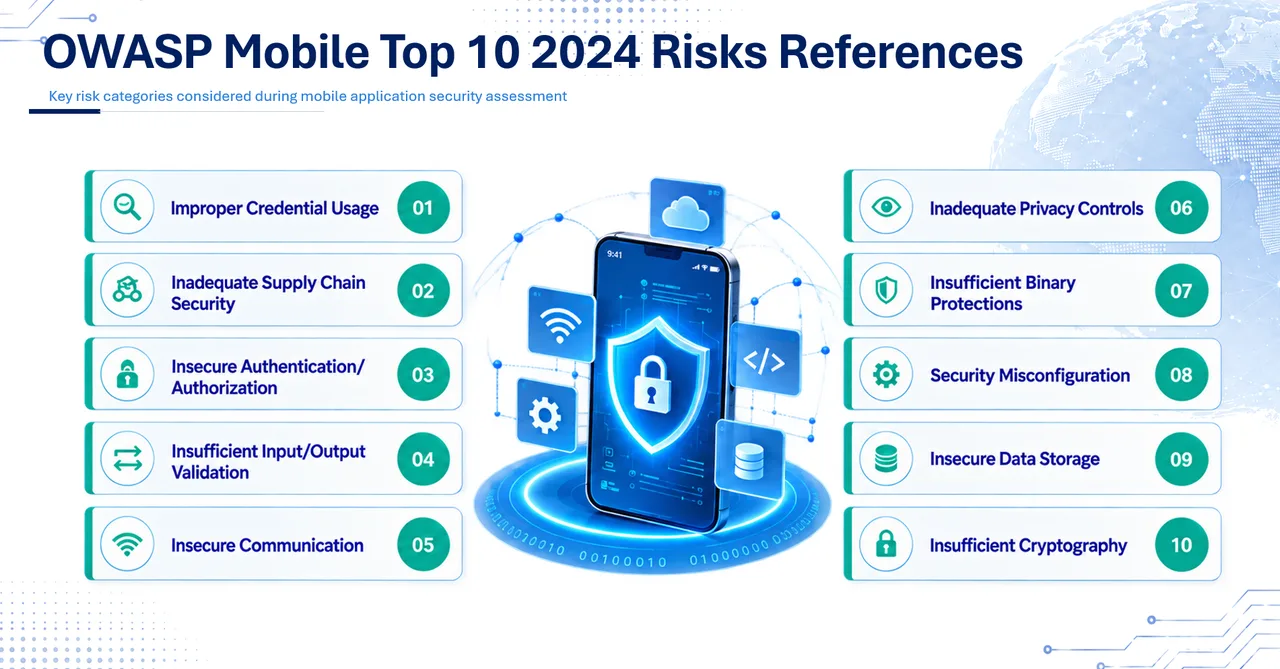
OWASP Mobile Top 10 2024
วิธีการทดสอบ
- OWASP Mobile Application Security Testing Guide (MASTG) — ใช้เป็น test case framework หลัก
- OWASP Mobile Application Security Verification Standard (MASVS) v2.0 — กำหนดระดับ security requirement (L1/L2/R)
- OWASP Mobile Top 10:2024 — เน้นช่องโหว่ที่พบบ่อยในแอปมือถือ
- Static & dynamic analysis ผสมผสาน — reverse engineer binary และทดสอบ runtime behavior จริง
- Backend API testing ควบคู่ — ทดสอบ API ที่แอปเรียกใช้ในบริบทของ mobile client
สิ่งที่คุณจะได้รับ
- Executive Summary — สรุปความเสี่ยงภาพรวมของแอปมือถือสำหรับผู้บริหาร
- Technical Report — รายละเอียดช่องโหว่พร้อมภาพหน้าจอ, code snippet และขั้นตอน reproduce
- MASVS Compliance Matrix — แสดงผลการทดสอบเทียบกับ MASVS requirement ทุกข้อ
- Remediation Guideline — คำแนะนำการแก้ไขเฉพาะ platform (Swift/Kotlin/Flutter/React Native)
- Risk Register (Excel) — สำหรับติดตามสถานะการแก้ไขและรายงานต่อ regulator
- ระยะเวลา
- 8–20 วันทำการ (ต่อ platform)
- ราคาโดยประมาณ
- เริ่มต้นที่ระดับ 8 manday ต่อ platform — ขึ้นอยู่กับจำนวน feature, offline capability และ security control ที่ต้องทดสอบ — คำนวณงบเอง
คำถามที่พบบ่อย
ต้องส่ง source code ให้ทีมทดสอบหรือไม่?
ไม่จำเป็นครับ การทดสอบสามารถทำได้แบบ black-box โดยใช้ไฟล์ APK/IPA เท่านั้น ทีมงานจะทำ reverse engineering เพื่อวิเคราะห์ binary เอง อย่างไรก็ตาม หากมี source code ให้ จะช่วยเพิ่มความครอบคลุม (coverage) โดยเฉพาะในส่วน business logic ที่ซับซ้อน และลดเวลา reverse engineering ลงได้มาก
การทดสอบ iOS กับ Android แตกต่างกันอย่างไร?
แตกต่างกันมากในรายละเอียดครับ Android สามารถ decompile ได้ง่ายกว่า ตรวจสอบ local storage ได้หลากหลาย (SharedPreferences, SQLite, file system) และ modify runtime ผ่าน Frida ได้สะดวก ส่วน iOS มี sandbox ที่เข้มงวดกว่า ใช้ Keychain สำหรับ credential storage ต้อง bypass jailbreak detection ด้วยเทคนิคเฉพาะ และการ reverse engineer Swift/Objective-C binary มีความซับซ้อนกว่า ดังนั้นจึงต้องใช้เครื่องมือและเทคนิคเฉพาะ platform
ต้องทดสอบทั้ง 2 platform หรือเลือกทดสอบแค่ platform เดียวได้?
สามารถเลือกทดสอบ platform เดียวได้ครับ แต่แนะนำอย่างยิ่งให้ทดสอบทั้ง iOS และ Android เพราะแม้จะเป็นแอปเดียวกัน แต่ช่องโหว่มักไม่เหมือนกัน เนื่องจาก security model ของแต่ละ platform แตกต่างกัน เช่น แอปอาจปลอดภัยบน iOS แต่มี insecure local storage บน Android หรือกลับกัน ราคาคิดแยกต่อ platform
แอปที่พัฒนาด้วย Flutter หรือ React Native ทดสอบได้หรือไม่?
ได้ครับ ทีมงานมีประสบการณ์ทดสอบแอปทุก framework ทั้ง native (Swift/Kotlin), cross-platform (Flutter, React Native, Xamarin) และ hybrid (Ionic, Cordova) แต่ละ framework มีจุดอ่อนเฉพาะที่แตกต่างกัน เช่น Flutter ใช้ Dart AOT compilation ทำให้ reverse engineering ยากกว่า แต่มีจุดอ่อนด้าน certificate pinning bypass ที่ต้องใช้เทคนิคเฉพาะ
สนใจ Mobile Application Penetration Test?
บอกเราว่าระบบเป็นแบบไหน อยู่ภายใต้ regulator ใด เราจะบอกได้ทันทีว่าต้องทดสอบอะไร ใช้เวลาเท่าไร และงบประมาณโดยประมาณ